
MxPro 5 Firmware Releases

Here you can find out what’s included in the latest versions of MxPro 5 panel firmware. If you have any queries or suggestions, please contact us.

View all of our release notes.

v60.04

Support has been added for the Argus Mark2 wireless translator (TW-MTI-02) and wireless expander (TW-ME-02) which can now provide further battery details to the MxPro 5 control panel, including device battery level and battery efficiency.

The wireless Argus detectors now also support sensitivity and mode changes programmed from the MxPro 5 control panel, and wireless door holders now support a configurable fail safe option for compliance with BS7273-B/C.
Joanne Waddell0113 September 11, 2026 Share

Walk tests can now be initiated and carried out through AdvancedLive.

Joanne Waddell0110 September 11, 2026 Share

Panel firmware versions, access levels, and the panel types (control panel, repeater, TouchControl, BMS) are now passed to AdvancedLive.

Joanne Waddell0101 September 11, 2026 Share

Full fail safe support for the CHQ-MRC2/FS has been added to meet BS7274-3 requirements. When the CHQ-MRC2/FS is used it will show as its own device with fail safe enabled, separate to the CHQ-MRC2 (without fail safe).

Joanne Waddell0113 September 11, 2026 Share

v60.03.06

We’ve added further improvements to the robustness and reliability of network communications.

Joanne Waddell01243 December 5, 2025 Share

When using False Alarm Management, up to 200 building areas can be used consistently.

Joanne Waddell0583 December 5, 2025 Share

The ESPA Interface (MXP-547) can now receive network fire events from MxPro 4 panels.

Joanne Waddell0414 December 5, 2025 Share

Improvements to the activation time of Hyfire Taurus wireless sounders.

Joanne Waddell0422 December 5, 2025 Share

v60.03.05

When the panel reports a fire condition [in a particular zone], the sounders [in that zone] activate and can be silenced via the panel display.
If a new fire is detected in a different zone to the first activation, sounders across the network will re-sound by default.
If the default settings have been changed, and the panel has been programmed to re-sound the sounders from a ‘New Device in Fire’ instead of ‘New Zone in Fire’, only the local sounders would operate instead of the sounders across the network.
This update ensures that sounders re-sound correctly across the network when ‘New Device in Fire’ is programmed.

Joanne Waddell0612 August 28, 2025 Share

v60.03.04

The panel no longer re-boots when performing a test print.

Joanne Waddell0215 August 28, 2025 Share

AdvancedLive now remains live if there is a conflict between cloud messages and signals from AdvancedLive. This means it’s easier to determine whether communication fails are due to the panel, the network, or the cloud communications.

We’ve also improved message reliability and network visibility when a Gen2 MxPro 5 panel is connected to AdvancedLive. Plus, sounders connected to the panel can now be resounded from AdvancedLive.

Joanne Waddell0167 August 28, 2025 Share

The responsiveness of the panel display has been increased when viewing events on the panel.

Joanne Waddell0218 August 28, 2025 Share

We’ve improved the reliability of network communications when there is a lot of network data.

Joanne Waddell0267 August 28, 2025 Share

v60.03.03

Initialising calibration on a Nittan panel no longer causes rate of rise heat detectors to enter fire condition.

Joanne Waddell065 July 24, 2025 Share

When using remote indicators on a Hochiki protocol panel, the LEDs now operate without needing to be programmed within cause and effect output groups.

Joanne Waddell0193 July 24, 2025 Share

On a mixed networked system of MxPro 5 Gen 1 and Gen 2 panels, events and text now show correctly in the log.

If viewing a Gen 2 panel log from a Gen 1 panel across the network, AdvancedLive no longer shows ‘Not Connected’ faults as CO life safety events, and CO life safety events now show the associated text.

If viewing a Gen 1 panel log from a Gen 2 panel across the network, CO life safety events no longer show as ‘Not Connected’.

Joanne Waddell057 July 24, 2025 Share

When using Apollo protocol MxPro 5 panels with Discovery multisensors and the heat point enabled, the panel no longer reports a ‘Too Low’ fault against the heat point sub-address.

The panel now retrieves the correct analogue value from enabled heat points so that the correct device state is reported.

Joanne Waddell0142 July 24, 2025 Share

v60.03.02

When an Apollo protocol panel has been programmed to change device sensitivities according to a time clock, the pre-alarm value no longer returns to 20 every time the programming is uploaded into the panel. This means you no longer need to change device sensitivity through the panel menu.

Joanne Waddell0180 July 24, 2025 Share

We’ve improved communication timing so that fault-tolerant network earth faults and wiring faults are reported correctly.

Joanne Waddell0154 July 24, 2025 Share

v60.03.01

Outputs activated in AdvancedLive are now consistently communicated to the panel network.

We’ve also improved AdvancedLive status indication so that occasional incidents of AdvancedLive online sites appearing to be offline no longer occur.

Joanne Waddell0115 July 24, 2025 Share

v60.03.00

While the panel configuration is being updated, the panel will now log a ‘Config Updating’ event in the log as well as a ‘Config Updated’ event once the configuration has been successfully uploaded.

Joanne Waddell0177 October 1, 2025 Share

On an AV protocol panel using wireless devices, the wireless translator reports analogue values to the panel, and the panel uses these analogue values to indicate fires, faults, pre-alarm etc.

The text associated with these analogue values (fire, fault, pre-alarm etc.) has been added into all relevant sections of the panel, where previously this was missing.

Joanne Waddell067 July 24, 2025 Share

Nittan sounders and beacons now activate as programmed during alarm verification.

Joanne Waddell031 July 24, 2025 Share

When a panel has been left in diagnostics logging mode and it is re-booted, the panel no longer displays faults that did not exist on the panel display.

These faults, ‘Loop Card Incompatible’, ‘Loop Card Device Missing’ and ‘Earth Fault’, may have existed for a brief period while the panel was initialising but are now ignored until the panel has fully initialised and are no longer logged during power up. Loop card firmware will also need to be updated to v4.06 or greater.

Joanne Waddell059 July 24, 2025 Share

AV protocol devices have a magnet test feature. If the devices are programmed to use a non-latching input action (e.g. general alarm, fire evacuate, pre-alarm), they will now reset and come out of test, irrespective of input action, when the ‘Reset’ button is pressed on the panel.

For further information on magnet testing, please refer to:

Joanne Waddell058 July 24, 2025 Share

When an AV panel is networked to a BMS interface, loop outputs can now be manually turned on from the graphics software, through the BMS. Previously, this was not possible.

Also, when AV and Nittan protocol panels are networked to a BMS interface, they are now able to consistently receive ‘Evacuate’ and ‘Alarm’ as well as Fire’ signals.

Joanne Waddell026 July 24, 2025 Share

If a download is taken using PC-NET-022 configuration software after erasing the panel configuration, the network sector programming now shows the correct default settings and only local sectors will be ticked.

Joanne Waddell045 July 24, 2025 Share

On Apollo protocol panels, sounders will no longer show ‘Device Missing’ after a configuration upload until devices have initialised.

Joanne Waddell093 July 24, 2025 Share

When the panel is re-booted, Core Protocol devices incorrectly report “Unapproved device” until they have initialised. This fault will no longer appear when Core Protocol devices are initialising.

Joanne Waddell068 July 24, 2025 Share

When viewing devices from the panel display (Access level 3 -> Loops -> View/Edit), the sensitivity of devices can now only be adjusted if the device supports this. Previously, sensitivity options were showing for all devices, irrespective of device type and whether the sensitivity could be adjusted.

Please refer to ‘860-167-07A MxPro 5 Apollo’ for device sensitivity options.

Joanne Waddell031 July 24, 2025 Share

On a panel network, information is not sent or received by any panel in access level 3 and the panels will only send and receive signals when in access levels 1 or 2.

When panels are networked to a BMS interface and an event comes through from the graphics system (fire, fault, disable, enable etc.), only panels in access levels 1 and 2 receive this information.

A change has been made to ensure that when a panel is taken out of access level 3 and put into access level 2, events from the BMS interface are re-sent, so the panel receives an update across the network to respond to the event (enable, disable, fire, fault etc.).

Joanne Waddell050 July 24, 2025 Share

Axis-WSM devices have a built-in microphone test feature. This test feature is now disabled by default to prevent the panel from displaying a fault when incorrectly fitted sounders fail the test. The feature can be enabled from within PC-NET-022 configuration software v12.2 or greater.

Joanne Waddell014 July 24, 2025 Share

When a CHQ-WSB2 is auto-learned onto a Hochiki panel, it is recognised as a YBO-BSB. If a download is taken using the PC-NET-022 configuration tool and manually changed to a CHQ-WSB2 before uploading to the panel, a ‘Type Change’ fault no longer appears and CHQ-WSB2 can now be correctly identified by the panel during an auto-learn.

If a CHQ-POM is connected to a Hochiki panel and the output of this device is inverted through PC-NET-022 configuration software, the output voltage of the device now increases from 0V to 24V.

Joanne Waddell080 July 24, 2025 Share

In access level 2 if a user tries to gain access to a panel menu and enters an incorrect password, when ‘Password Not Recognised’ displays, the user level will remain unchanged.

Joanne Waddell061 July 24, 2025 Share

When ‘Disable Zone’ is either programmed or conducted manually, all inputs in that zone will now be disabled, not just fire inputs.

Joanne Waddell036 July 24, 2025 Share

The configuration programming stored within the panel has a unique identifier – the checksum number. When a download is taken using PC-NET-022 software, the checksum number is displayed on the download and matches the panel checksum number

We have made updates to ensure that the checksum number remains the same even when a different version of configuration software is used to upload into the panel. This ensures that only time the checksum number changes is when configuration changes are made.

For example, if a download is taken using PC-NET-022 v12.1 and an upload is completed using a different version e.g. PC-NET-022 v12.2, the checksum number will now remain unchanged (as long as no programming changes are made).

Joanne Waddell045 July 24, 2025 Share

After a panel re-boot, Apollo Discovery Open Area sounders no longer report ‘Device Missing’ while the loop card powers up. The panel now waits for loop cards to fully power up before displaying loop device faults.

Joanne Waddell0120 July 24, 2025 Share

Hochiki CHQ-PCM devices will now be able to report HVAC faults if the device has failed to open, close or run as expected.

Joanne Waddell049 July 24, 2025 Share

On Hochiki protocol panels, the first alarm condition reports within 10 seconds of device activation. An improvement has been made to ensure all subsequent alarm conditions also notify the panel within 10 seconds of each device activation, while still maintaining prompt output activations.

Also, group control is now supported on all output types. Previously this was only available for sounders and beacons.

Please refer to 680-168-04 MxPro 5 Hochiki protocol addendum for further information.

Joanne Waddell0128 July 24, 2025 Share

We’ve improved the order in which outputs turn on from an activation. Sounders and beacons in the zone of origin have the highest priority and turn on first. Then all other sounder and beacons will activate. All relay outputs will turn on last.

Joanne Waddell053 July 24, 2025 Share

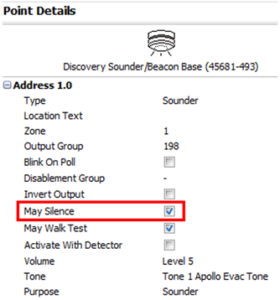
The ‘Sounder Disabled’ LED and any output group programmed to operate from a sounder being disabled now activate from any sounder being disabled, even if no sounders have been programmed with the ‘May Silence’ enabled.

Previously, if ‘May Silence’ was unticked and that sounder was disabled, the ‘Sounder Disabled’ LED and the programmed output group would not turn on.

Joanne Waddell064 July 24, 2025 Share

MxPro 5 panels are approved to EN54-13 which means the loop and sounder circuits are monitored to ensure they will operate as intended during a fire condition.

As this standard is not mandatory in the UK and Ireland, this feature is now disabled as default. It can be turned on from the front of the panel (Access level 3 -> ‘Next Menu’ -> ‘EN54-13’) or through PC-NET-022 configuration software.

Please refer to 680-212-01 EN45-13 Overview for further information on EN54-13.

Joanne Waddell0102 July 24, 2025 Share

When connected to the panel using a direct USB lead, an earth fault no longer shows if the PC is connected to mains i.e. when it is charging. When in access level 3, the panel will ignore this earth fault for 5 minutes following a new connection.

Joanne Waddell0119 July 24, 2025 Share

Faults on an AV protocol panel are now consistently reported within 90 seconds.

Joanne Waddell044 July 24, 2025 Share

We’ve updated the FastTest feature on Apollo protocol panels to include support for Apollo’s Tri-Sensor. We’ve also added clearer text making it easier to see which devices have passed and failed when viewing the device states (Access level 3 -> ‘Loop’ -> ‘View/Edit’).

Joanne Waddell052 July 24, 2025 Share

When a control panel re-boots, a ‘CPU Reset’ is recorded in the log. The firmware version will also now be displayed next to the ‘CPU Reset’ event.

Joanne Waddell084 July 24, 2025 Share

Any user notes (up to 950 characters) you’ve entered in the PC-NET-022 configuration software are now still available to you when transferring the configuration to and from the panel.

Joanne Waddell094 July 24, 2025 Share

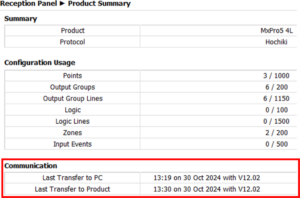
The date and time of the last upload is now recorded and displayed within the ‘Product Summary’ section when you take a download within PC-NET-022 configuration software.

Joanne Waddell049 July 24, 2025 Share

The configuration software now blocks communication and displays a warning if the incorrect version of PC-NET-022 configuration software is used. This ensures the panel firmware is compatible with the latest version of the ConfigTool.

In this release, the minimum required version is V12.00.

Joanne Waddell0197 July 24, 2025 Share

v60.02.01

When using the EN54-13 monitoring settings within the panel, the loop current can now be set to a minimum of 25mA. Previously, this was set to 100mA.

Please refer to 680-212-01 EN45-13 Overview for further information on EN54-13.


Joanne Waddell0147 July 24, 2025 Share

v60.02.00

If a detector has alarm verification enabled, the verification countdown timer will start when the device reaches high-alarm. Previously, this countdown timer would start when the device enters pre-alarm state. This improves the accuracy of the alarm verification timer.

Joanne Waddell075 August 28, 2025 Share

When Gen 1 and Gen 2 panels are networked as part of a standard network, there is no longer a delay in the network establishing, and network faults are now not displayed during this time. In addition, the standard network has been improved so it can establish a connection faster and before network faults are displayed.

Joanne Waddell052 July 24, 2025 Share

When Apollo Soteria sounder bases and beacon bases are in the same output group, the beacons will now synchronise with the sounders and activate at the same time. Previously, the beacon bases were delayed in turning on until after the sounders had activated.

Joanne Waddell073 July 24, 2025 Share

Networked panels will now log device text against events which originated on a panel across the network. Historically, the device text was only logged for local activations.

Joanne Waddell057 July 24, 2025 Share

After a panel re-boot, when the panel is in normal operation without any faults, ‘Device Initialising’ is displayed next to the devices when in the ‘View’ menu.

Previously, as soon as an event came through, ‘Device Initialising’ would disappear and the device status would change to show the event. To improve visibility, ‘Device Initialising’ will now be displayed at the top of the “View” menu to indicate if any devices are still initialising.

Joanne Waddell062 July 24, 2025 Share

MxPro 5 and Axis EN panels allow you to change the loop numbers for easier fault finding and reporting. For example, on a 4-loop panel, the loops will be numbered from 1-4 as default but can be changed to loop numbers 5-8.

Now, if the loops are re-numbered, a ‘New Device’ fault will consistently show the re-numbered loop number rather than the original loop number.

Please note, the firmware on all network panels will need to be updated to v60-03-00 or later to fully support this improvement.

Joanne Waddell0104 July 24, 2025 Share

When AV protocol panels are using wireless devices, the wireless translator consistently reports as a radio interface. This update addresses a radio interface occasionally reporting as a zone monitor.

Joanne Waddell057 July 24, 2025 Share

Apollo wireless sounder bases and relay modules now consistently report the correct battery fault messages. This update addresses cases where a battery fault would display as a generic device fault. Accurate device states now show on the panel display and in the log.

Joanne Waddell061 July 24, 2025 Share

You no longer need a ‘LiveMod’ and BMS interface to connect to AdvancedLive. MxPro 5 Gen 2 base cards have AdvancedLive connectivity built in via Ethernet, so you only need a single node on the network to establish an AdvancedLive connection.

We’ve also improved connection stability.

Joanne Waddell083 July 24, 2025 Share